










From Classroom Icebreaker to Corporate Team Building: One Tool That Actually Scales
The challenge of finding an activity that works for both a rowdy classroom of thirty students and a quiet team-building session with remote colleagues has frustrated educators and managers for years. Most games are either too childish for adults or too complex for quick icebreakers. Then I started testing imposter game across these radically different environments, and I found something unexpected: a single browser-based platform that adapts to both extremes without compromising the experience for either group.
The Scale Problem That Most Party Games Ignore
Walk into any classroom or office, and you'll see the same tension. The activity needs to engage everyone, but the tools available are either designed for small groups or require so much setup that the facilitator spends more time managing logistics than actually leading the session. Digital solutions often make this worse – app downloads fail on school devices, login requirements block participants, and the game mechanics don't scale beyond a dozen players.
What Changes When You Remove the Download Barrier
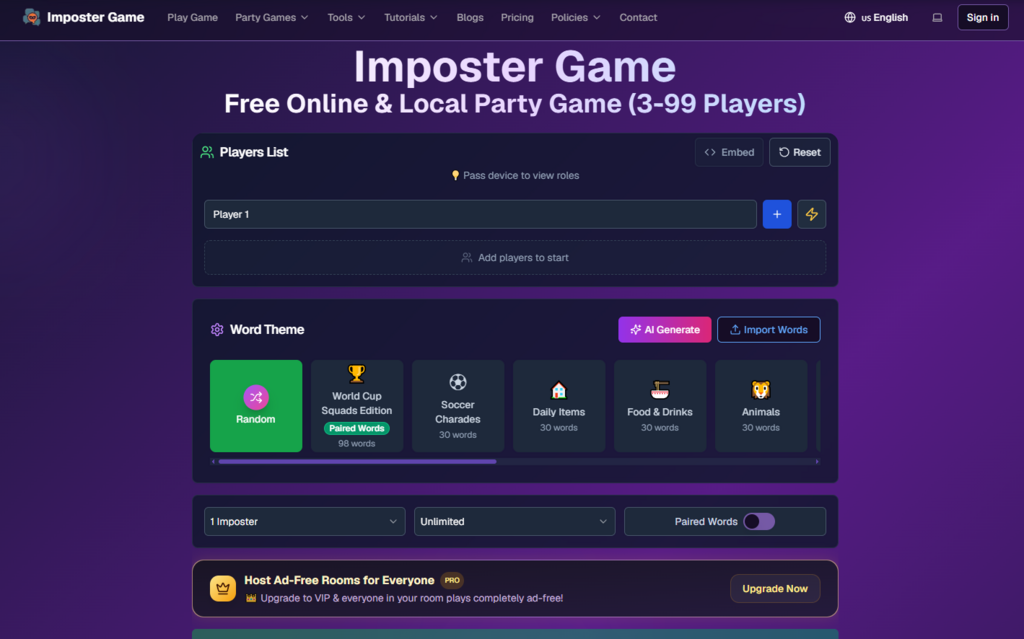
The first time I used Imposter Game in a classroom setting, I projected the game state on a TV while students joined on their phones. No app store. No account creation for local mode. Just a browser and a URL. The students were in the game within sixty seconds. For a teacher who has watched half a class period disappear to technical issues, this alone was worth the price of admission – which, notably, is zero.
Two Modes, Two Radically Different Use Cases
The platform's architecture supports both local and online play, but the real value emerges in how these modes serve different group dynamics.
Local Mode: The Classroom and Living Room Solution
For in-person settings with a single display – a classroom projector, a living room TV, or an office monitor – the local mode turns one device into the game's control center. The facilitator adds player names, selects a word theme, and passes the device around for private role reveals. The group then discusses and votes without everyone staring at their own screens.
Why Projecting the Game State Changes the Dynamic
What I observed in classroom testing is that projecting the game state on a big screen keeps everyone oriented. Students can see the phase timer, the vote count, and the round progress without looking at their phones. The discussion stays focused on the room rather than fragmented across individual devices. For groups of 3 to 99 players, this scales effortlessly – the only limit is how many people can comfortably see the display and participate in discussion.
Online Mode: The Remote Team and Distributed Classroom Tool
When participants are spread across locations, the online mode takes over. The host creates a private room and shares a six-character code or QR invite. Each player joins from their own browser, enters a nickname, and the game syncs in real time across all devices. The host can manage the room from anywhere, and the game progresses through clue, discussion, voting, and reveal phases with all players synchronized.
The Synchronization That Keeps Remote Groups Cohesive
During remote testing with colleagues across different time zones, the real-time sync made the experience feel more connected than typical video call activities. The built-in timers kept rounds from dragging, and the automated voting and reveal mechanics removed the awkward "everyone type your vote in chat" moment. The platform even offers a Chrome extension for environments where regular browser access is restricted – a feature that proved useful for school club sessions on locked-down networks.
The Word Ecosystem That Adapts to Any Audience
One of the platform's most underrated features is its word flexibility, which becomes critical when switching between age groups and professional contexts.
3,600+ Official Words Across Categories and Languages
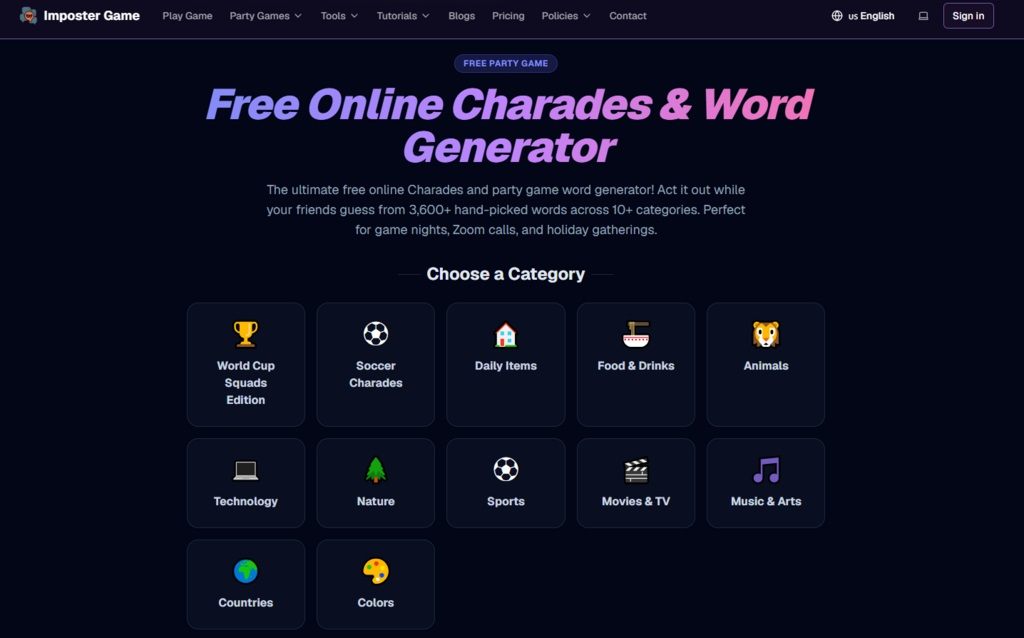
The curated collection includes over 3,600 official words across ten categories, fully localized in twelve languages. This breadth matters more than it might seem. A classroom teacher can pull age-appropriate vocabulary. A corporate facilitator can select professional or industry-relevant terms. A family gathering can use the general category that suits mixed-age participants. The localization includes culturally relevant themes – Chinese New Year references, Japanese anime terms, Spanish regional variations – which makes the game genuinely usable for language learning or multicultural groups.
Custom Word Imports for Specific Training or Teaching Goals
For facilitators who need precise control over content, the custom import feature is essential. You can upload a .txt file or paste words directly, and the system handles duplicate removal, length validation, and format optimization. This opens up use cases beyond entertainment: vocabulary drills, industry terminology practice, team-building exercises with company-specific references, and themed content for special events. The standalone word generator tool, which pulls from ten categories across five languages, is particularly useful for quickly producing themed lists without manual curation.
Built-In Moderation That Lets Facilitators Participate
One of the biggest challenges for teachers and team leads is that they often end up moderating rather than playing. Imposter Game automates enough of the administrative load that facilitators can actually join the fun.
Smart Role Assignment and Automatic Balancing
The system handles role distribution based on player count – one imposter for 3-5 players, two for 6-8, three for 9-12 – with the option for manual adjustment. This removes the guesswork and potential bias from role assignment. The role reveal management ensures that each player sees their role privately, whether through the pass-and-play local method or the simultaneous reveal in online mode.
Timers, Voting, and Progress Tracking Without Manual Intervention
Each phase runs on customizable timers that keep games moving. The voting system collects and tallies votes automatically. The game tracks progress through clue, discussion, voting, and reveal phases, displaying the current state clearly. In a classroom setting, this means the teacher doesn't need to watch the clock or count votes. In a corporate session, it means the facilitator can focus on guiding discussion rather than managing logistics.
A Practical Comparison for Facilitators and Educators
|
Setting |
Recommended Mode |
Key Advantage |
|
K-12 classroom |
Local with projection |
No student accounts needed; age-appropriate content; Chrome extension for restricted networks |
|
University seminar |
Online or local |
Custom word imports for subject-specific vocabulary; 12-language support for language classes |
|
Corporate team building |
Online with custom words |
Import company or industry terms; large player capacity for whole departments |
|
Remote team meeting |
Online |
Six-character code for quick join; real-time sync across time zones |
|
After-school club |
Local or online with extension |
Works on school devices; no download required; scalable to club size |
The table reflects my experience across different facilitation contexts. The platform's flexibility across these settings comes from its refusal to lock into a single use case – it works equally well for a fifth-grade vocabulary game and a senior management offsite.
Where the Experience Depends on Facilitator Preparation
As with any tool, the quality of the experience depends on how it's used. The word list is the most critical variable. A well-chosen custom import generates engaging rounds; a generic or poorly translated list can fall flat. The AI clue and hint generator – which provides civilian metaphors and imposter camouflage tips for credits – can supplement facilitator preparation but isn't a substitute for thoughtful word selection. In my testing, the AI suggestions ranged from useful to generic, and results varied depending on the word and context.
The platform also doesn't have a native mobile app, so browser performance matters. On modern devices, the responsive design handles everything smoothly. On older classroom tablets or computers, the experience might not be as polished. The online mode requires a login, which adds a small barrier for spontaneous sessions. And while the VIP upgrade removes ads for the entire room, the free version remains fully functional – the ads are present but not intrusive enough to disrupt facilitation.
The Groups That Benefit Most From This Approach
Based on real usage across educational and professional settings, certain groups derive particular value. Classroom teachers gain a flexible icebreaker that works on school networks with the Chrome extension. Language instructors can use the twelve-language localization for vocabulary practice. Corporate facilitators can import custom word packs for training exercises. Event organizers can use the large player capacity for conference icebreakers. Content creators can use the word generator to quickly produce themed materials.
The platform's safety and inclusivity features also matter for institutional use. Content is reviewed for classroom and family appropriateness, with difficulty levels suitable for ages eight and up. The localized content includes native translations and culturally relevant examples, which makes the game genuinely usable for diverse groups rather than offering a superficial translation.
Does It Hold Up Across Repeated Facilitated Sessions?
After using Imposter Game across classrooms, team meetings, and family gatherings, the verdict is clear: it delivers on its promise of a browser-based social deduction game that adapts to how groups actually gather. The local mode preserves face-to-face interaction for in-person sessions. The online mode keeps remote groups synchronized. The word ecosystem – with 3,600+ official words, twelve languages, and custom imports – prevents the repetition that kills most party games.
The Imposter Game online experience isn't the most visually polished option, and it doesn't offer the production values of a premium app. But for facilitators who need a flexible, low-friction tool that works across devices, languages, and group sizes, it fills a niche that most alternatives miss. It meets participants where they already are – on the browsers they already have – without forcing them to download, register, or reconfigure their devices. For anyone who has ever watched a classroom period or team meeting dissolve into technical troubleshooting, that simplicity is worth more than any feature list.