








Label Printer Buying Guide 2026: How to Choose the Right One for Your Business
Somewhere between the first lockdown-era Etsy shop boom and today's overnight-shipping expectations, the humble label printer quietly became one of the most-searched pieces of small-business equipment online. If you're running a shop, packing orders, organizing a stockroom, or just tired of peeling crooked labels off a sticky sheet, a dedicated label printer changes the game almost immediately. This guide walks through what label printers actually do, the technology behind them, and exactly what to look for before you buy.
What Is a Label Printer, and Why Not Just Use a Regular Printer?
A label printer is a compact, purpose-built device that prints directly onto adhesive label stock — shipping labels, barcodes, price tags, name tags, you name it. Unlike an inkjet or laser printer loaded with A4 paper, a label printer feeds individual rolls of label media and prints at the exact size you need, one label at a time, often in under a second.
The biggest difference, though, is the printing technology. Most label printers on the market today use direct thermal printing: a heated printhead reacts with chemically treated label paper to create the image, with zero ink, toner, or ribbon involved. That single design choice solves three problems at once — no recurring ink costs, no dried-out cartridges, and no smudging. You just load a roll and print.
Thermal Printing Technology: The Part That Actually Matters
If you start comparing label printers, you'll quickly run into two specs that show up everywhere: DPI (resolution) and connection type. Here's what they mean in practice.
Resolution (DPI): Most label printers print at 203 DPI, which is sharp enough for shipping labels, barcodes, and standard text — genuinely all most sellers ever need. Higher-end models step up to 300 DPI, which produces noticeably crisper logos, smaller barcodes, and fine print, making it the better choice for retail branding, jewelry tags, or anything where label appearance matters as much as function.
Connection type: This is where label printers have evolved the most.
- USB models are the simplest and most reliable — plug in, install a driver, print. Great for a single desktop setup.
- Bluetooth models pair with a phone, tablet, or laptop and let you print from anywhere in the room, which is ideal if you're packing orders away from a desk.
- Wi-Fi / AirPrint models connect over your network, so multiple people or devices can send print jobs without any cables at all — useful for small teams or shared workstations.
A growing number of current label printers, including several across MUNBYN's thermal printer lineup, now offer both USB and Bluetooth on the same unit, which removes the need to choose one connection method and stick with it forever.
Who Actually Needs One?
It's easy to assume label printers are only for warehouses, but the use cases have spread much further:
- Online sellers and small businesses use them constantly for shipping labels, barcodes, return labels, and product tags — and most modern label printers integrate directly with Shopify, Etsy, eBay, Amazon, and carriers like UPS, USPS, and FedEx, so there's no manual resizing or reformatting before printing.
- Retail and warehouse teams rely on them for price tags, shelf labels, and SKU stickers, where speed and barcode accuracy directly affect how smoothly a stockroom runs.
- Home organizers have quietly become one of the biggest growth segments — printing labels for kitchen containers, storage bins, file folders, and kids' belongings. The pastel and colored label-printer trend on social media isn't a coincidence; once people see how fast and tidy a labeled pantry looks, they tend to keep going.
- Teachers and students use compact models for classroom organization, book labeling, and name tags.
- Crafters and small-batch makers print planner stickers, gift tags, and handmade product labels without needing a full print shop.
If your routine currently involves hand-writing labels, printing on a regular printer and cutting them out, or buying pre-printed sticker sheets that never quite fit, a label printer pays for itself within the first few weeks of use.
Key Features Worth Comparing
Before buying, run through this checklist:
- Print speed: Many current models print roughly one 4×6 label per second, which matters a lot if you're batching dozens of shipping labels at once.
- Replaceable printhead: Thermal printheads are a wear item. Models that let you swap the printhead instead of replacing the whole printer save money over a few years of heavy use.
- Single vs. dual color: Standard direct thermal printing is black-only. A small number of printers, like MUNBYN's 405B, can print in two colors (black plus red or blue) using special dual-color label stock — handy for highlighting discounts, urgent shipments, or branded accents without buying a full-color printer.
- Device compatibility: Check that the printer supports your actual setup — Windows, Mac, Chromebook, iOS, and Android coverage varies slightly between models, and Bluetooth/Wi-Fi units typically need a companion app.
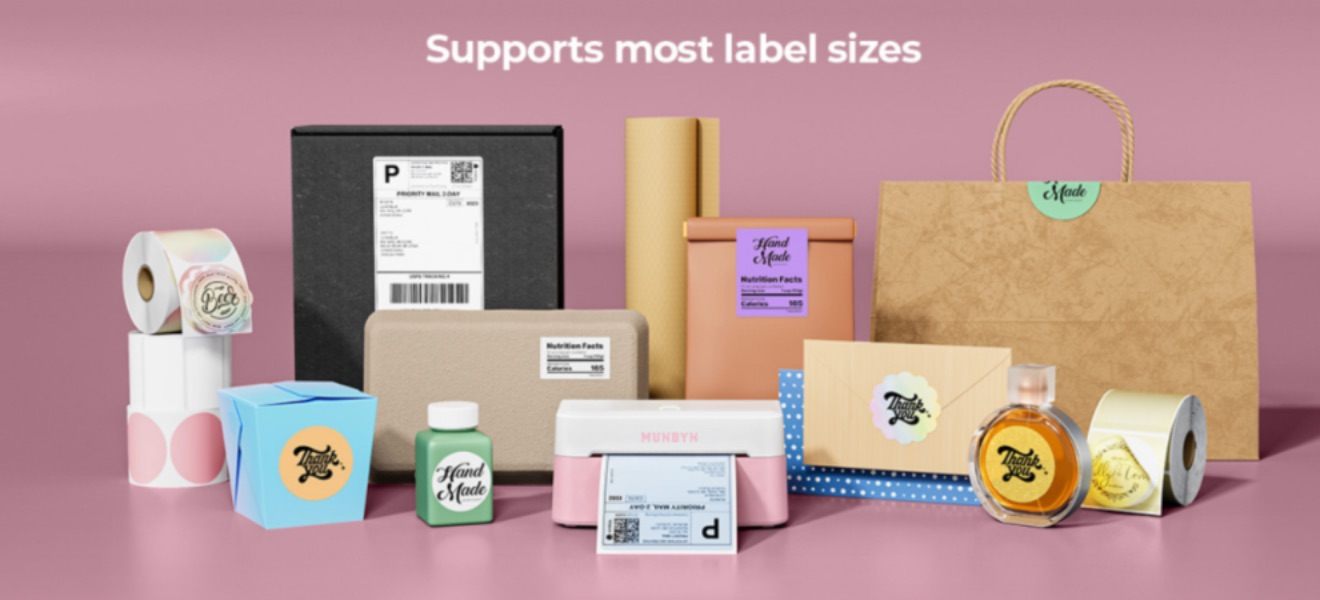
- Label size flexibility: If you're printing anything beyond standard 4×6 shipping labels — small jewelry tags, wide shelf labels, name badges — confirm the printer's supported width range before buying labels in bulk.
- Build quality and warranty: Because these printers run constantly in a small business, a solid warranty (commonly two years on reputable models) and accessible customer support matter more than they might on a printer you use twice a month.
Receipt Printers vs. Label Printers
It's worth a quick note here, since the two get confused often: a receipt printer prints on a continuous roll of thermal paper (no individual label backing), and it's built for point-of-sale transactions, not adhesive labels. If you need both — say, printing receipts at checkout and shipping labels in the back room — most brands sell them as separate dedicated devices rather than one hybrid machine, simply because the media handling is different.
How Much Should You Expect to Spend?
Entry-level Bluetooth and USB label printers generally sit in the £70–£140 range, which covers the vast majority of small business and home use cases. Step up to 300 DPI or AirPrint-enabled models, and you're typically looking at £140–£250, justified mainly if branding quality or driver-free setup across multiple Apple devices matters to your workflow. Dual-color printers and higher-end voice/AirPrint combo units sit at the top of that range.
Final Thoughts
A label printer is one of those purchases that feels like a minor upgrade right up until you actually use one — and then it becomes impossible to imagine going back to hand-written labels or a regular printer. The decision really comes down to three things: how you'll connect it (USB, Bluetooth, or Wi-Fi), how sharp your labels need to look (203 DPI vs. 300 DPI), and how heavily you'll use it day to day. Get those three right, and almost any modern thermal label printer will serve you well for years.
If you're ready to compare models side by side, browsing MUNBYN's full label printer collection is the fastest way to weigh resolution, connectivity, and price before you commit.